Taking payment
Take cash and card at the till, split a bill between guests, add tips, and know what happens when a payment goes wrong.
Tap Charge on the point of sale to open the pay screen. A payment is only recorded once the money is confirmed taken, and an order closes only when its balance is exactly zero.
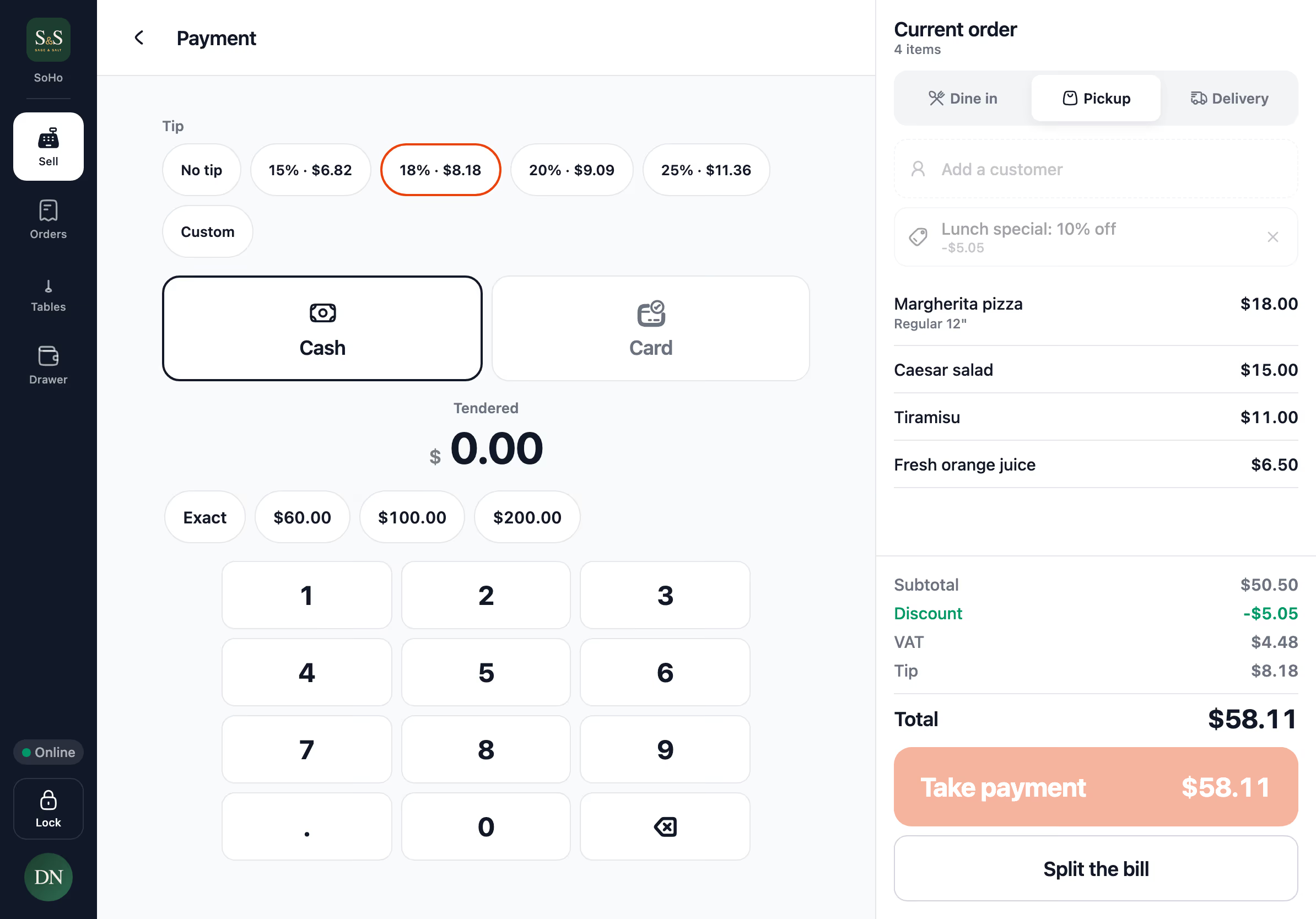
#Cash
Tap Cash and enter what the customer handed over. The change due is shown large enough to read at arm's length, and the quick buttons cover the exact amount and the usual notes.
Cash works without a connection. The drawer opens, the receipt and kitchen ticket print from the till's own printer, and the sale sends itself when the connection is back. A receipt printed offline carries a provisional reference; the order number replaces it once the sale has gone through.
You need an open cash session to take cash. If the till has none, the pay screen says so and offers to open one. See Cash management.
#Card
Tap Card and hand the terminal to the customer. The till holds the sale open while the reader works and then shows one of:
- Approved: the money is taken and the order settles.
- Only part of it went through: the card covered less than the full amount. The rest stays on the bill; take it another way.
- Declined: nothing was taken. The order and the cart are untouched, so try another card or take cash.
- Cancelled at the terminal: the customer or the reader backed out. Nothing was taken.
- The terminal didn't answer: Restro checks with your payment provider before telling you anything. If no money moved, the screen says so plainly.
Card payments need a connection. If the terminal is offline the pay screen says so and offers cash instead. Readers are registered once under Settings → Devices; see Devices.
#Splitting a bill
Tap Split the bill on the pay screen. There are three ways to divide it:
- Evenly: choose how many ways. Each share is shown before you take it.
- By item: tap the lines this guest is paying for. Tax and tip come along in proportion, so nothing is left on the last payer.
- Amount: type any figure up to the balance due.
You can mix methods on one bill: part cash, part card, part store credit. The running balance at the top shows what has been settled and what is left, and the order closes the moment it reaches zero.
When a total does not divide evenly, the odd cent goes on the first share. Split $10.01 three ways and the shares are $3.34, $3.34 and $3.33, which always add back to the total.
If a bill is part paid and the app is closed, nothing is lost. Reopen the terminal and the order is in Orders marked Partly paid with the amount still owing.
#Tips
Where tipping is on for the branch, the tip step appears before you take the money. The tip is attributed to the member signed in on the till and flows into Analytics → Tips without anyone keying it in twice. On a split bill the tip is divided in the same proportion as the shares.
#When something goes wrong
A customer is never charged twice. Tapping Take payment twice, a timeout, a retry or a crash mid-payment all end in a single charge.
If the app is closed while a payment is in flight, the next launch shows Checking an unfinished payment. Restro asks the provider what became of it before letting you touch the order. Do not charge it again; wait for the answer.
Sometimes the money taken and the order disagree: a reader that took more than it was asked for, or an order flagged paid with nothing behind it. The order is then marked with the mismatch and the amount, so it surfaces at reconciliation.
#Refunds and voids
An order with any money taken against it cannot be voided; refund it instead. Voiding is for orders where nothing was collected. See The order lifecycle for how voids, comps and refunds differ and who can approve them.
#Discounts at the till
Add a discount on the ticket lists everything the cart qualifies for right now, biggest saving first. It also takes a code the customer has. Automatic discounts apply on their own; choosing one by hand replaces it.
Discounts work offline. A usage-limited discount is confirmed when the order goes through. If it ran out while the terminal was disconnected, the order is honored at the price quoted and flagged, never repriced behind the customer.
#Related
Did this page miss something? Tell us.
Back to top