Kitchen display
What the kitchen sees, how a ticket moves with one tap, and how tabs, pre-orders and special requests appear on it.
The kitchen display is a full-screen view of live orders as tickets, and nothing else. A Cook who signs in lands straight on it, and managers can open it from the dashboard as well.
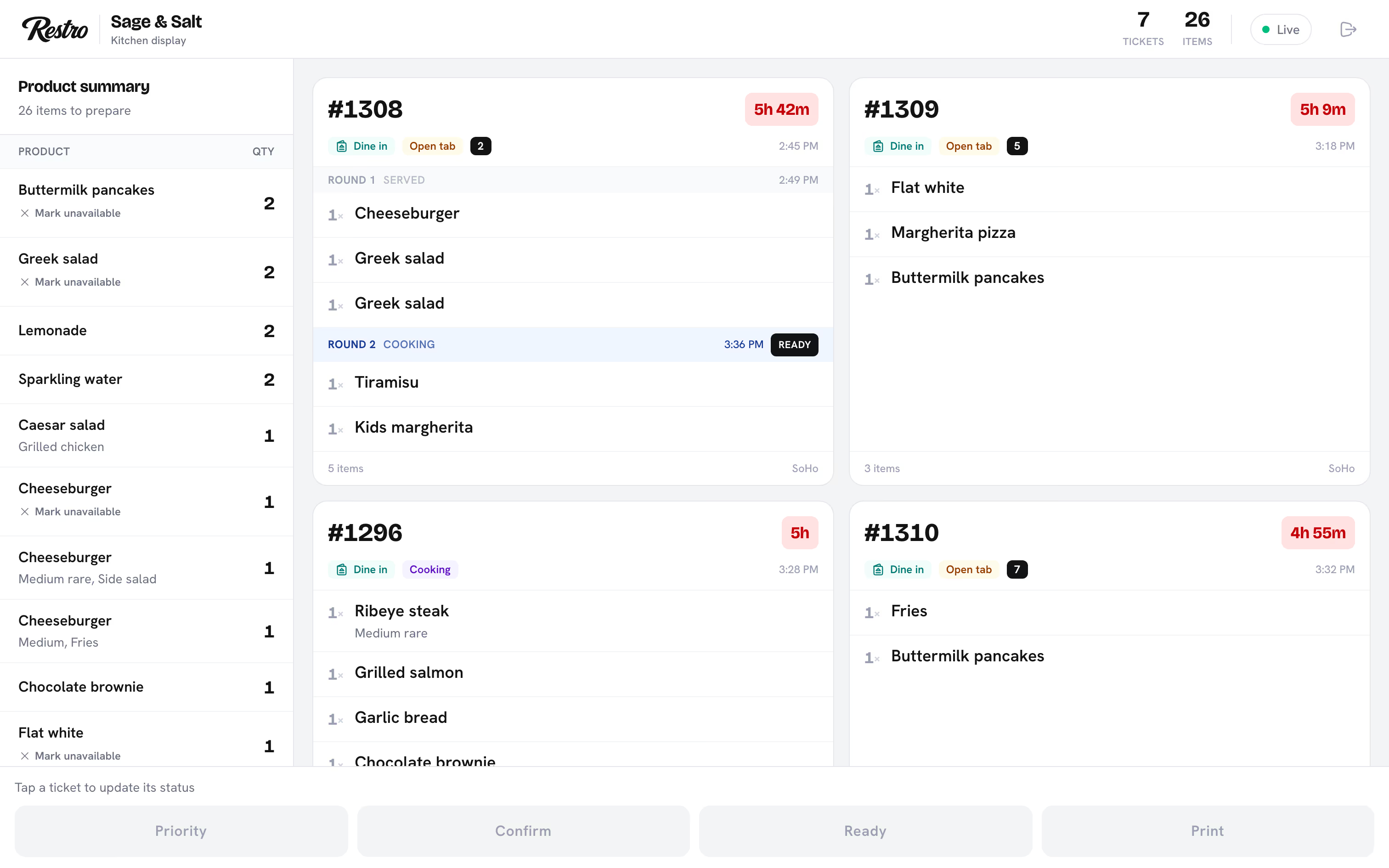
#What the screen shows
Each ticket shows the order number, its type (Pickup, Delivery or Dine in) and the items with quantities. It also shows how long the order has been waiting and any notes. The Product summary alongside adds up every item still to prepare, so a cook can see that six Margherita pizzas are due without reading six tickets.
#One tap per step
A new ticket arrives marked New. Tap it to move it on: Confirm, then Cooking, then Ready. The display only offers the next step, so nobody skips one by accident. Once the food is handed over the order is Completed.
The dashboard shows the same order as Pending, Confirmed, Preparing and Ready. If another station has already moved a ticket, the display says so instead of moving it twice.
#Rounds for tables
At a table, guests order in waves. Each wave is a round: the items sent to the kitchen at one moment. A tab appears on the board By round, so a second round of drinks is not mixed into the first round's mains.
Each round has its own state: New, Cooking, Ready and Served. Move a round with Start, Ready and Served. The tab stays on the board while any round is unserved, and a round sent an hour later joins the same ticket. The whole-order steps do not apply to a tab; move its rounds instead.
#Scheduled for later
Pre-orders do not sit in the queue all day. They wait in the Scheduled for later panel above the tickets, each with its due time and a countdown. Each one drops into the queue at the lead time set for the branch. See Order ahead.
#An empty screen on a new account
Cooks only see orders for the branches they are assigned to. A cook with no branch assignment sees an empty board, which is the usual cause of an empty screen on a new account. Assign the cook to the branch under Staff and the tickets appear.
#Notes and special requests
Order notes and per-item special requests both appear on the ticket and on the printed kitchen ticket. If special requests on one item are becoming a problem, turn Special requests off for that item in the menu editor.
#Related
Did this page miss something? Tell us.
Back to top