Features
Choose which optional parts of Restro your restaurant uses, and see how that choice interacts with branches and your plan.
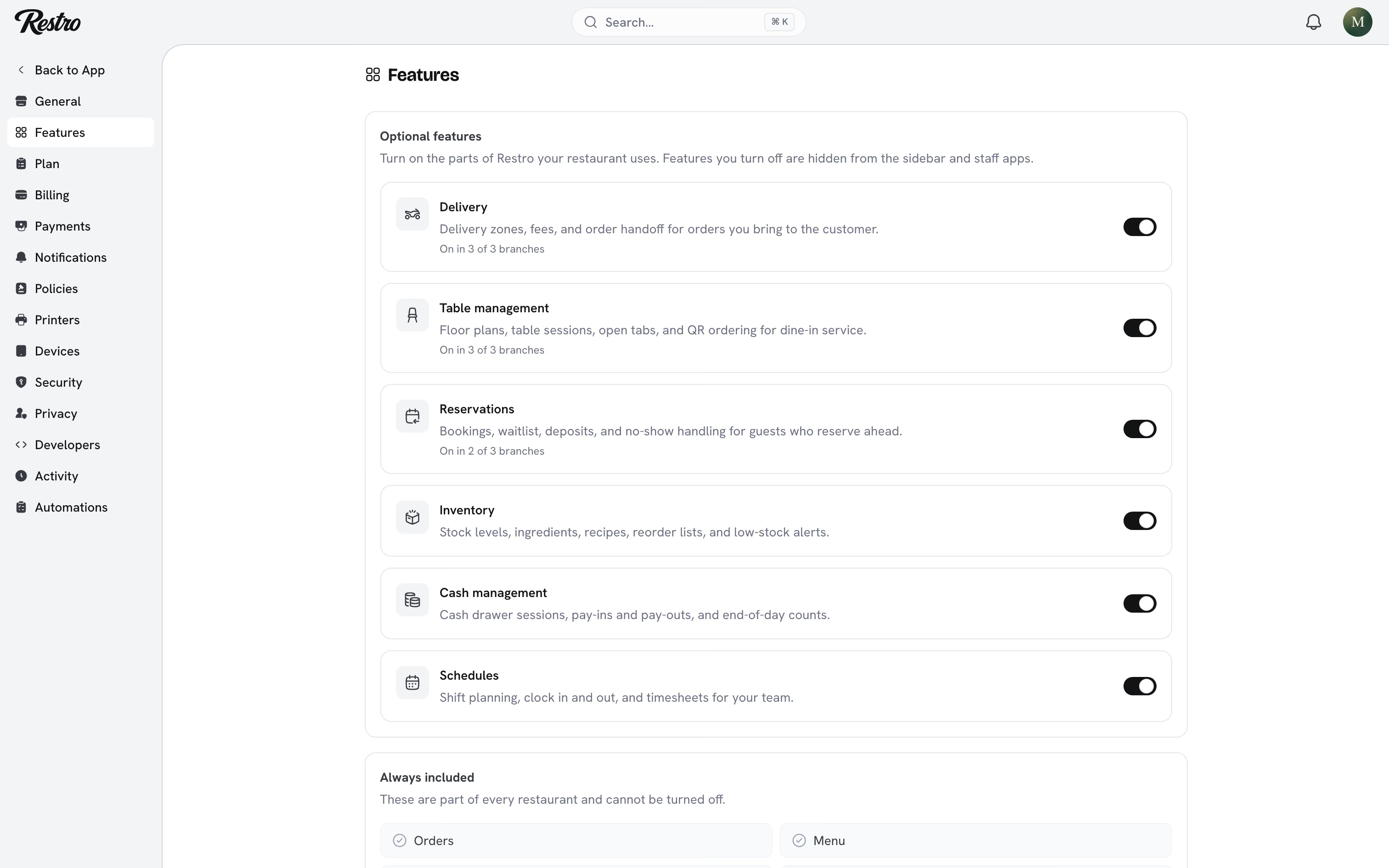
Settings → Features lets you switch off the parts of Restro you do not use. The sidebar, the home page and the staff apps then only show what your team works with.
#Always included
Orders, menu, customers, discounts, branches, staff and analytics are part of every restaurant. They cannot be turned off.
#Optional features
- Delivery: delivery zones and fees, and the Delivery order type.
- Table management: floor plans, table sessions, open tabs and QR ordering.
- Reservations: bookings, waitlist, deposits and no-show handling.
- Inventory: stock levels, ingredients, recipes, reorder lists and low-stock alerts.
- Cash management: drawer sessions, pay ins and pay outs, and end-of-shift counts.
- Schedules: shift planning, clock in and out, and timesheets.
You pick these during setup on the What will you use? step. Change them here at any time: flip the switches and click Save. Owners and admins can change them. Managers can see the page.
#What turning a feature off does
The feature disappears from the sidebar, the mobile navigation, the command palette and the home page. Its pages stay reachable by URL but show a short notice with a Turn on button instead. An old bookmark never leads to a dead end.
Nothing is deleted. Reservations, stock counts, cash sessions and shifts are kept, and turning the feature back on brings everything back as it was.
A few features do a little more when they are off:
- Inventory stops sending low-stock alerts. Stock still moves with orders.
- Cash management hides the drawer on the point of sale and lets staff take cash without an open session.
- Delivery, Table management and Reservations are also turned off on every branch. Customers can no longer order delivery, scan a table code or book. Restro asks you to confirm and tells you how many branches are affected.
#Features and branches
Delivery, dine in and reservations are branch settings first, which has two consequences:
- Turning one on for a branch turns the feature on. If reservations are off and a manager enables them for SoHo, Reservations appears in the sidebar for everyone.
- Turning it off on the last branch turns the feature off. When no branch offers delivery any more, the Delivery feature switches off too. A temporary Closed status does not count.
Turning one of these three on from this page works the other way round. With a single branch, the branch setting comes on at the same time. With several, the page shows how many branches have it on and reminds you to enable it per branch under Branches.
#Features and plans
Reservations, inventory, cash management and schedules are only in some plans. When yours does not include one, its switch is disabled and marked Not in your plan with an Upgrade link. A feature that was already on when you moved to a smaller plan stays on. Once you turn it off, you cannot turn it back on without upgrading. See Plans and billing.
#Where the choice shows up
- The point of sale hides the drawer tab when cash management is off.
- The home page hides the reservations, staff on the clock and low-stock cards.
- The menu item editor hides the recipe section when inventory is off.
- The order form only offers Delivery and Dine in when those features are on.
- Analytics → Operations hides labor, cash variance and reservation figures for features that are off. Analytics → Tips hides the by-shift breakdown when schedules are off.
- Every change is written to Settings → Activity, including the ones triggered by a branch setting.
Did this page miss something? Tell us.
Back to top